


If you are an engineer, inspector, or machinist, you’ve probably heard the term “Geometric Dimensioning and Tolerancing” or “GD&T” before. But not every industry uses GD&T, and if you are new to—or work outside of—engineering or manufacturing, you may be wondering:
What is GD&T?
In this article, we define GD&T as, “…a set of rules and GD&T symbols used on a drawing to communicate the intent of a design, focusing on the function of the part.”
But in this Question Line video, Jason takes an even bigger step back, starting with the familiar concepts of dimensions and tolerances and building from there to explore how geometric dimensions and tolerances differ. Rather than simply establishing numerical ± limits, geometric tolerances define a geometric shape—a three-dimensional tolerance zone—within which the feature being measured must fall.
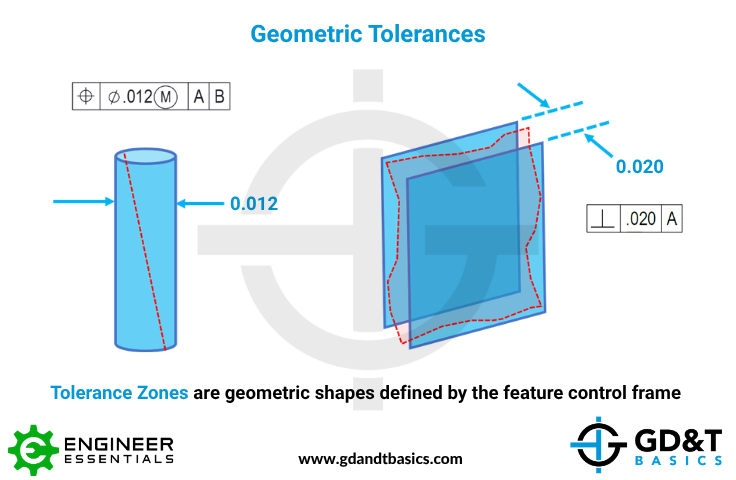
Jason also briefly explains that GD&T uses a standardized set of symbols and rules established by ASME and ISO to communicate these geometric dimensions and tolerances on engineering drawings.
Watch the video below for a clear introduction to what GD&T is and what makes it different from traditional dimensioning and tolerancing. When you are ready to learn the how and why behind GD&T, explore our training options to take your understanding to the next level.
Have a GD&T question you’d like us to answer? Submit it using the link below, and it could be featured in an upcoming Question Line video.
https://www.gdandtbasics.com/share-your-gdt-questions/
If your question is selected, we will notify you when our video answer is posted to our YouTube channel.
* If you are a current student, reach out to us directly and we will get you into contact with your instructor. Active students’ questions receive a direct response within 24-48 hours.
The one-page GD&T reference that you will use every day
A visual breakdown of every core GD&T symbol and what it controls, all on one page. Bookmark it. Print it. Actually use it.
Download the Chart